You
can enable a quick link that will allow your users to inform you of a
website getting blocked via email that they need access to.
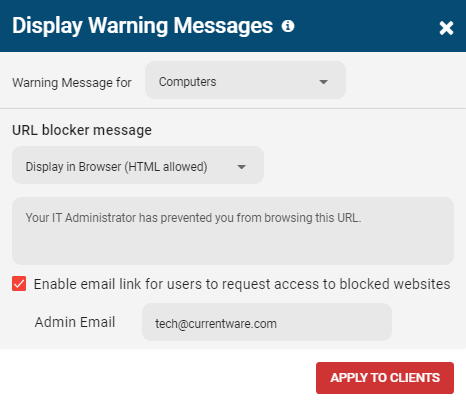
Enable the request access email link for URL Blocks
Open the CurrentWare web console
Go to BrowseControl on the left-hand side
Select the More Options and then the Display Warning Messages option
Enable the “Enable email link for users to request access to blocked websites” checkbox, and enter the email you want to receive the request emails
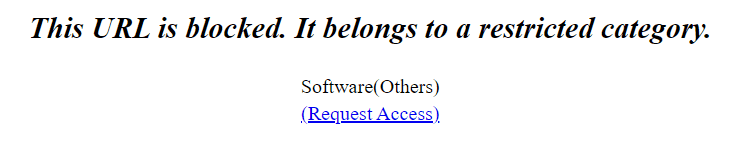
When
a user browses to a site that is blocked they will be displayed a
“Request Access” link as shown below. When a user clicks on the link, it
will open up their email client to send a request access email to the
administrator.
Enable the request access email link for Category Blocks
As of v9.0.1 -Administrators now have the ability to set category-based block warning messages with the “Request Access” button.
Open the CurrentWare web console
Go to BrowseControl on the left-hand side
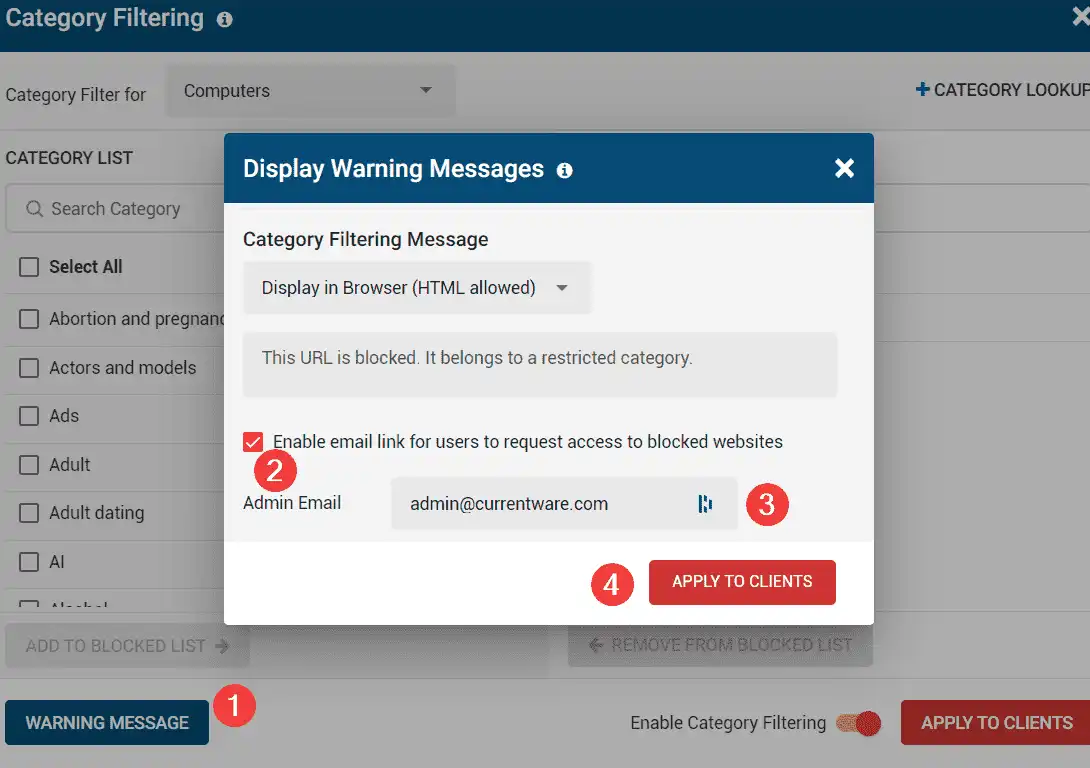
Select the Category Filtering button and then the Warning Messages(1) option
Enable(2) the “Enable email link for users to request access to blocked websites” checkbox, and enter the email (3) you want to receive the request emails.

and then the Display Warning Messages option
button and then the Warning Messages(1) option